
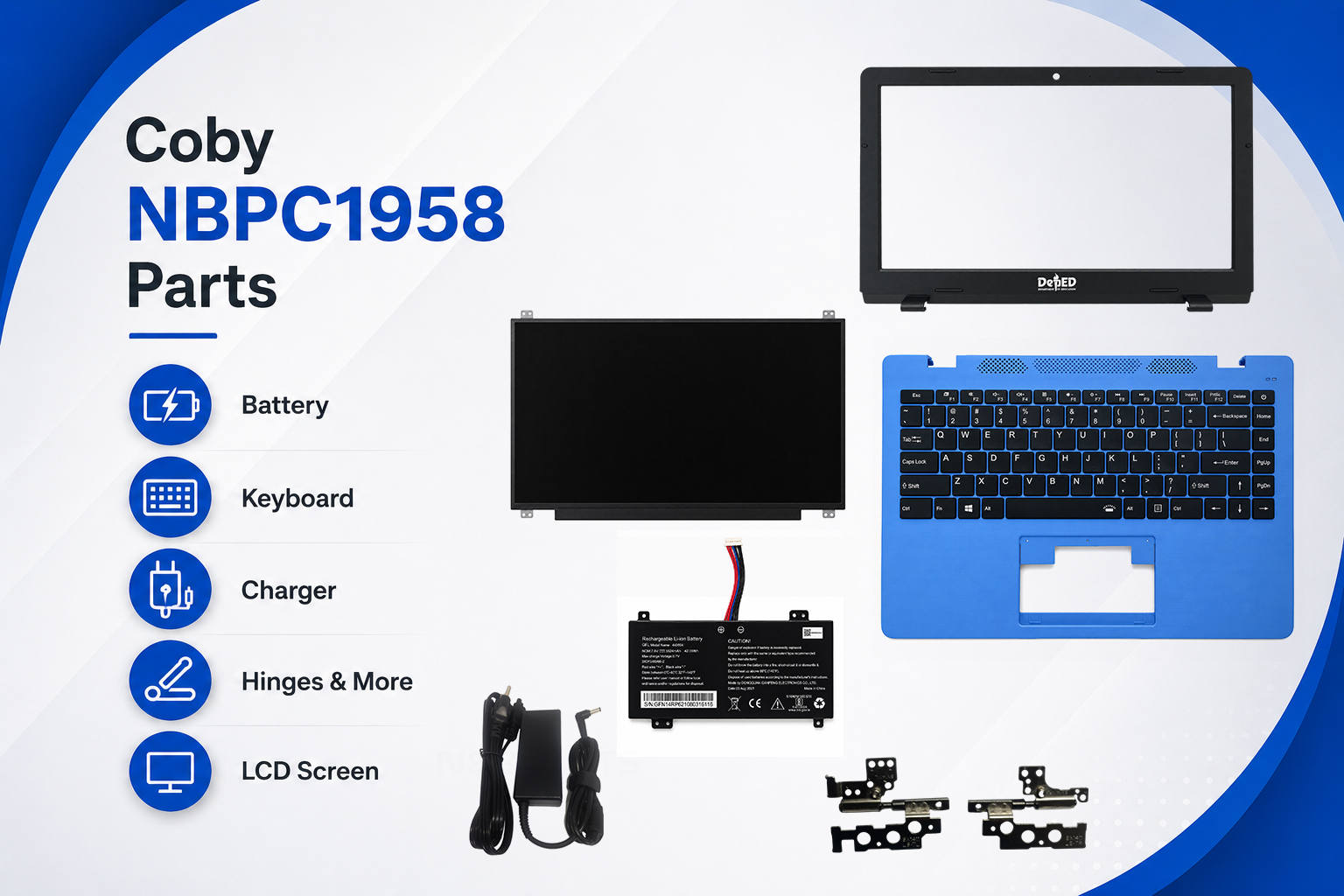
Looking for Coby NBPC1958 parts? If your Coby NBPC1958 laptop has a worn-out battery, damaged keyboard, faulty charger, or broken screen, replacing the defective component can be a more practical option than replacing the entire laptop.
The Coby NBPC1958 is one of the Coby notebook models still searched for by Filipino laptop owners, technicians, schools, and users of previously issued educational equipment. Finding the correct replacement part, however, can be challenging because compatibility depends on the exact model, part number, connector, size, and specifications.
This guide covers the most commonly needed Coby NBPC1958 replacement parts, including batteries, keyboards, chargers, LCD screens, and other components.
If you’re unsure which part you need, you can also send NebParts a photo of your original part so we can help you identify the correct replacement.
Coby NBPC1958 Replacement Parts
The most commonly searched replacement components for the Coby NBPC1958 include:
- Coby NBPC1958 battery
- Coby NBPC1958 keyboard
- Coby NBPC1958 charger
- Coby NBPC1958 LCD screen
- Laptop cooling fan
- DC power jack
- Display cable
- Other laptop replacement components
Not every part needs to be replaced at the same time. In many cases, replacing one failed component can bring an otherwise usable laptop back into service.
Coby NBPC1958 Battery
A deteriorating battery is one of the most common problems with an older laptop.
If your Coby NBPC1958 battery no longer holds a charge, the laptop shuts down immediately after removing the charger, or the battery percentage drops unusually fast, replacing the battery may restore normal portable use.
Signs You May Need a New NBPC1958 Battery
Watch for these symptoms:
- Battery drains unusually quickly
- Laptop shuts down when unplugged
- Battery remains at 0% or does not charge
- Laptop only works while connected to the charger
- Battery runtime has become very short
- Battery is no longer detected
- Battery has visible physical damage or swelling
Before ordering a replacement battery, compare the battery label, voltage, capacity, connector, and physical design with your existing battery.
Do not choose a battery solely because the listing says it is for a Coby laptop. Different Coby models can use different batteries.
Need a Coby NBPC1958 Battery?
Check our Coby NBPC1958 battery listing →Coby NBPC1958 Keyboard
A faulty keyboard can make an otherwise perfectly usable laptop frustrating or impossible to use.
If certain keys on your Coby NBPC1958 keyboard no longer work, several keys have become damaged, or the keyboard has suffered liquid or physical damage, replacing the keyboard may be all you need.
Common Keyboard Problems
You may need a replacement keyboard if:
- Individual keys are broken
- Keys are missing
- Some keys don’t respond
- Multiple keys type incorrectly
- The keyboard has liquid damage
- The keyboard is physically cracked
- The keyboard connector has been damaged
- The keyboard backlight no longer works, if equipped
Check the Keyboard Before Ordering
Laptop keyboards can look almost identical while using different connectors or mounting configurations.
Before buying a replacement, compare:
- Laptop model
- Keyboard layout
- Physical dimensions
- Connector location
- Number and position of mounting points
- Cable configuration
- Original keyboard part number
- Photos of the keyboard
Important: A keyboard designed for another Coby model should not be assumed to fit the NBPC1958 just because it looks similar.
VIEW OUR COBY NBPC1958 KEYBOARD MODULE →Coby NBPC1958 Charger
A missing or defective charger can make a working laptop appear completely dead.
If your Coby NBPC1958 charger has been lost, damaged, overheating, or has a broken cable or connector, you may only need to replace the AC adapter rather than the laptop.
Symptoms of a Bad Charger
Common signs include:
- Laptop does not power on
- Battery does not charge
- Charging repeatedly disconnects
- Charger cable is damaged
- Charging works only when the cable is positioned a certain way
- Adapter becomes unusually hot
- Charging indicator does not come on
However, a laptop that does not charge does not automatically mean the charger is faulty. The battery, charging port, DC jack, or motherboard charging circuit could also be responsible.
How to Choose the Correct Charger
Before buying a replacement adapter, compare:
- Input voltage
- Output voltage
- Output current
- DC plug size
- Polarity
- Connector type
- Original adapter model number
Never rely on the laptop model alone when choosing a charger.
The safest approach is to compare the information printed on your original adapter with the replacement listing.
View Our Coby NBPC1958 ChargerCoby NBPC1958 LCD Screen
A cracked LCD does not necessarily mean the entire laptop needs to be replaced.
If your Coby NBPC1958 screen is cracked, flickering, displaying lines, showing unusual colors, or has stopped displaying an image, replacing the LCD panel may be a viable repair.
Common LCD Problems
Look for:
- Cracked display
- Black or blank screen
- Vertical lines
- Horizontal lines
- Flickering
- Dead pixels
- Discoloration
- Backlight problems
- Display that cuts in and out
- Screen damage caused by impact
Before ordering an LCD, check the exact panel model number printed on the back of your existing screen.
Two laptop screens can have the same:
- Screen size
- Resolution
- Aspect ratio
and still be incompatible because of different connectors, mounting brackets, cable positions, or panel specifications.
Replacing the LCD
If you’re comfortable working on laptops, an LCD replacement may be straightforward. If not, consider having the screen replaced by a qualified technician.
[Browse available Coby laptop LCD screens →]
Browse available Coby laptop LCD screens →Other Coby NBPC1958 Parts
Depending on the condition of your laptop, you may need components beyond the battery, keyboard, charger, or LCD.
Other parts that may require replacement or inspection include:
Cooling Fan
A noisy or malfunctioning fan can cause overheating and performance problems.
Symptoms may include:
- Excessive fan noise
- Laptop becoming very hot
- Sudden shutdowns
- Reduced performance
- Fan not spinning
Display Cable
If the LCD itself is working but the image cuts out when you move the screen, the display cable or its connections may need inspection.
Hinges
Broken or loose hinges can put stress on the LCD housing and display cable. Repairing the hinge problem early may help prevent additional damage.
View Our NBPC1958 Hinges Listing
Why Choose Replacement Parts Instead of Replacing the Laptop?
When a laptop’s motherboard and major components are still working, repairing the defective component can make financial sense.
Lower Repair Cost
Replacing one component can cost significantly less than purchasing another laptop.
Extend the Laptop’s Useful Life
A new battery or keyboard can make an older laptop much more practical to continue using.
Reduce Electronic Waste
Repairing usable equipment instead of immediately disposing of it can help reduce unnecessary electronic waste.
Useful for Multiple-Laptop Owners
Schools, offices, repair shops, and organizations may benefit from keeping existing equipment operational rather than replacing every unit with a minor hardware problem.
Common Coby NBPC1958 Problems and What to Check
| Problem | Parts to Check |
|---|---|
| Battery drains quickly | Battery |
| Laptop shuts down when unplugged | Battery |
| Laptop won’t charge | Charger, battery, DC jack |
| Laptop won’t power on | Charger, battery, DC jack, motherboard |
| Keys don’t work | Keyboard |
| Broken keys | Keyboard |
| Cracked screen | LCD |
| Screen has lines | LCD, display cable |
| Screen flickers | LCD, display cable |
| Screen goes black when lid moves | Display cable, LCD |
| Laptop overheats | Cooling fan, thermal system |
| Charger connection is loose | DC jack, charger |
Remember that a symptom can have more than one possible cause. Proper diagnosis is important before purchasing a replacement component.
Frequently Asked Questions About Coby NBPC1958 Parts
What Coby NBPC1958 parts can I replace?
Depending on availability, common replacement components include batteries, keyboards, chargers, LCD screens, cooling fans, hinges, DC jacks, and display cables.
How do I know if a battery fits my NBPC1958?
Compare the battery model/part number, voltage, capacity, connector, and physical dimensions with your original battery. If possible, send a photo of the battery label before ordering.
Can I use another Coby laptop's battery?
Not necessarily. Even if another battery physically fits, its voltage, connector, wiring, or dimensions may be different.
Always verify compatibility first.
Can I use a universal charger?
A charger should only be used if its output voltage, current rating, plug size, polarity, and connector are compatible with the laptop.
How do I identify my Coby NBPC1958 LCD?
Remove the LCD carefully and check the model/part number printed on the rear label. This is usually more reliable than identifying a replacement solely by screen size.
My NBPC1958 won't charge. Do I need a new battery?
Not necessarily.
A charging problem can be caused by the:
- Charger
- Battery
- DC jack
- Charging circuit
- Motherboard
Test or inspect the relevant components before purchasing a replacement.
Can NebParts help me identify a part?
Yes. If you are unsure which component you need, send a clear photo of the original part, its label, connector, or the laptop’s model label. The more information you provide, the easier it is to check compatibility.
Shop Coby NBPC1958 Parts at NebParts
Need to repair a Coby NBPC1958 laptop?
Start with the component causing the problem instead of replacing the entire machine.
Browse available Coby NBPC1958 parts, including:
- Coby NBPC1958 Battery
- Coby NBPC1958 Keyboard
- Coby NBPC1958 Charger
- Coby NBPC1958 LCD Screen
- Coby NBPC1958 Hinges
- Coby laptop cooling parts
- Other Coby replacement parts
NebParts is based in the Philippines and serves customers looking for laptop parts, accessories, and repair components.
We offer COD on eligible orders, free shipping on qualifying orders, careful packaging, and a 1-month warranty on applicable parts.
Not Sure Which Part You Need?
Don’t guess. Send us a photo.
Take a clear picture of your original part, part-number label, connector, or laptop model sticker and contact NebParts. We’ll help you identify the replacement you need before you order.
Shop Coby NBPC2168 Replacement Parts
The Coby NBPC2168 model number alone may not always be enough to guarantee compatibility. Different revisions or component configurations can sometimes use different parts.
For the best match, compare the original component’s part number, specifications, connector, dimensions, and photos with the replacement part before ordering.
If you’re unsure, contact NebParts before purchasing.